Sites Studio: the website builder for French state schools
Product design and ownership for a website builder that lets state schools publish and run their own site, with no technical skills required.
- Role
- UX/UI Designer & Product Owner
- Client
- DRANE Brittany
- Duration
- 3 months
- Type
- Open-source SaaS
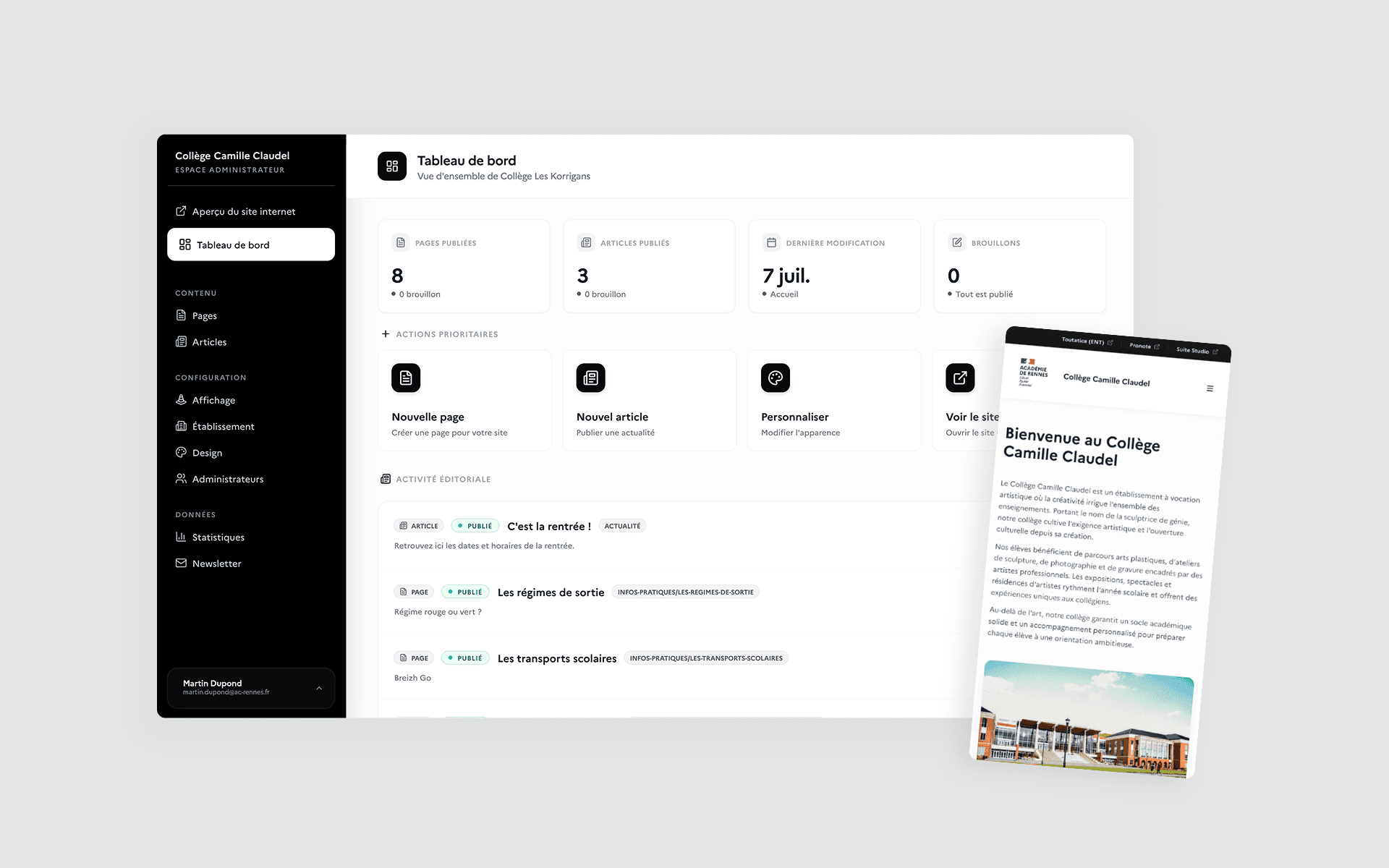
Sites Studio is a website builder for French primary, middle and high schools, designed by DRANE Brittany - the regional authority for digital education - with the agency Lumy. The goal: let every school build and maintain its own site independently, without technical skills. I was the only UX/UI designer and the Product Owner, working directly with the client alongside a solution architect and a full-stack developer.
The challenge
When DRANE Brittany approached us at Lumy, the brief was to replace a legacy CMS that had become hard to maintain and hard to learn for most schools.
The new product had to let state schools build and run their site independently while meeting the requirements that come with public service: free and open-source software, national digital sovereignty, accessibility standards, and the visual identity of the French State.
It quickly became clear that this was more than designing a CMS. The real question was:
How do you let hundreds of schools build and update their own website, with no technical skills, under exceptionally strict institutional constraints?
My role
A fixed-price project: the scope was set in the quote, and DRANE Brittany - the regional authority for digital education - owned the product. I was Product Owner on the agency side, at Lumy, and the only designer, working alongside a Solution Architect and a Full Stack developer. So my calls were never about what to build, but about how to turn that scope into a product: how far each feature should go, which rules applied, who could do what.
Within that scope, I chose to keep governance to two profiles, Admin and Super Admin, rather than open up a matrix of roles and permissions. I made the UAI code the front door of onboarding, so the product could prefill whatever it could infer and catch schools that already had a site instead of letting duplicates pile up. Rather than a blank page, I gave schools thirteen content blocks, and kept customisation inside four dimensions so that hundreds of sites would stay coherent and accessible.
I wrote those decisions and the rules behind them into the product specification, which stayed the single source of truth through development and up to delivery.
Designing from what people already do
I started by analysing the sites schools had built with the existing CMS, to understand how they actually used it: what they published, how they structured it, which layouts came back again and again, and which features they relied on day to day.
That analysis surfaced shared patterns behind sites that looked nothing alike: introducing the school, publishing news and events, highlighting important notices, offering resources, embedding external content, and making it easy to get in touch.
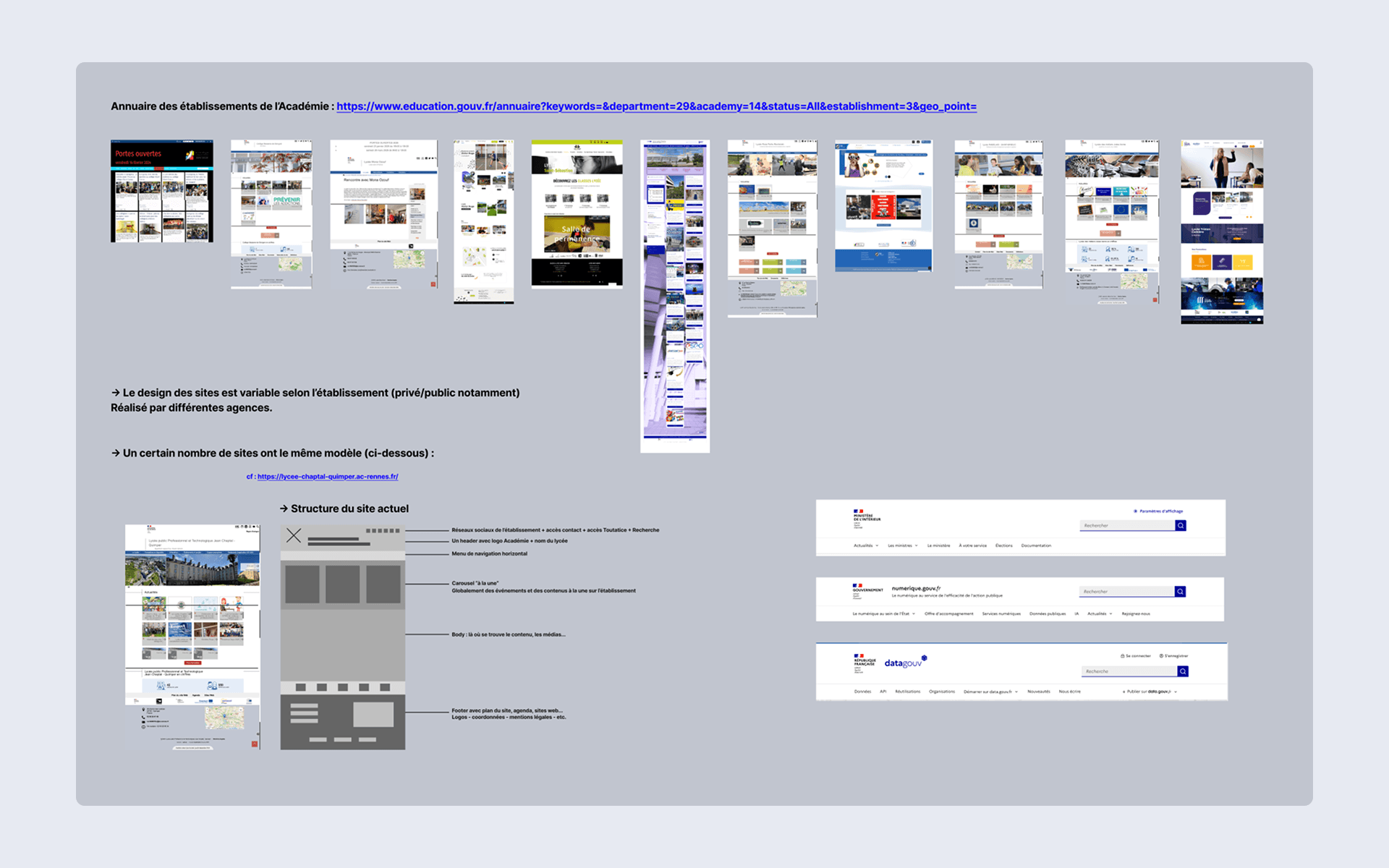
From those patterns I built the first wireframes and gradually defined how the product would work: pages and sub-pages, the block system, article management, roles and permissions, publishing rules, and the journey for creating a site.
The point was not to rebuild the CMS the education authority already had, but to understand what schools were doing with it - and design something simpler around their real needs.
Absorbing administrative complexity
Creating a website inside a French education authority depends on the type of school, the user's permissions, and whether a site already exists for that school.
Rather than exposing those rules through a run of administrative forms, I designed a progressive onboarding journey built around the UAI code - the national identifier every French school has - as its single entry point.
From that one piece of information, the system can pre-fill the school's details - name, type, address, phone, email - and generate its URL automatically.
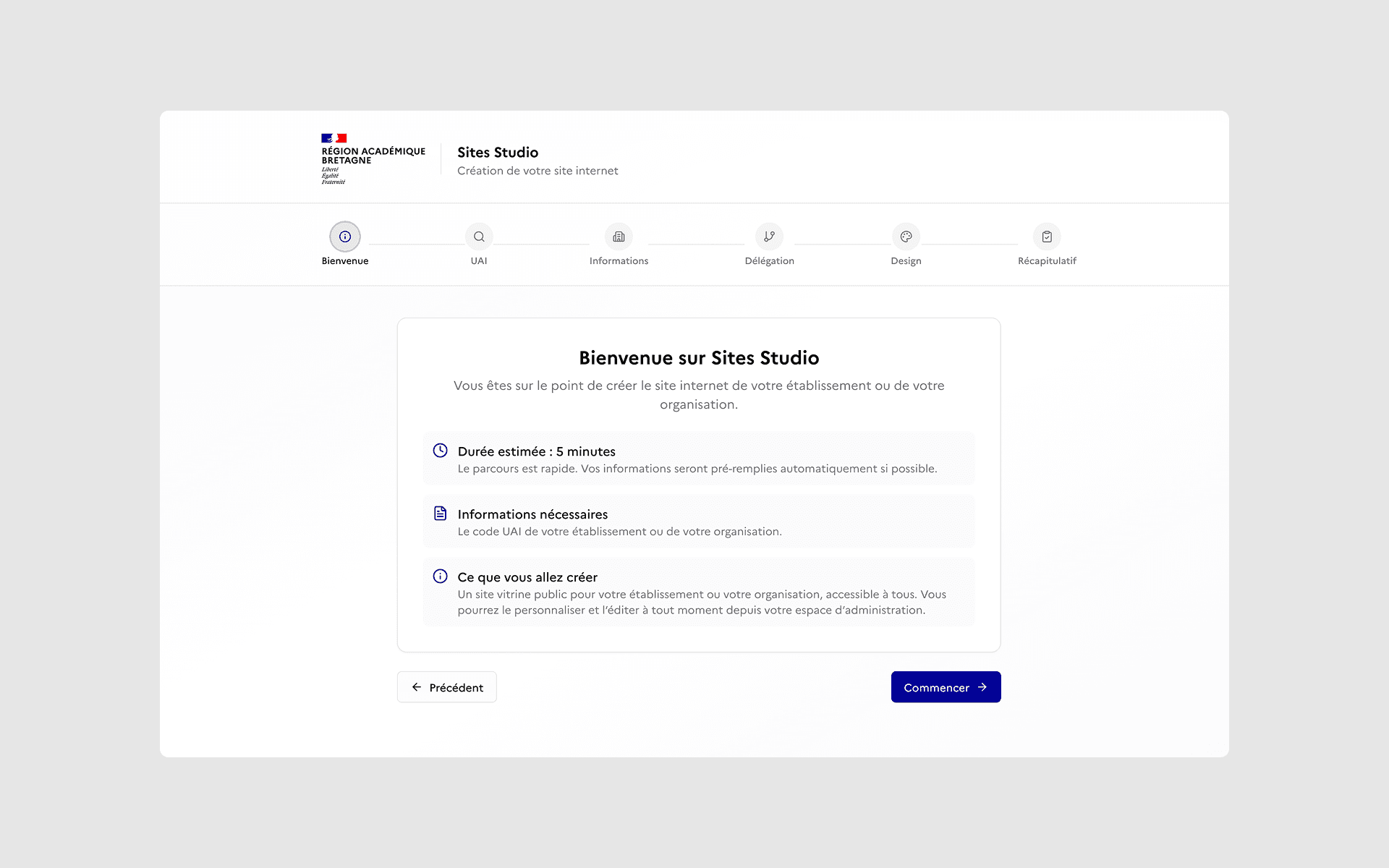
It also checks whether a site already exists. If one does, the user is pointed to it instead of creating a duplicate.
Once the school is identified, two paths open up: customise the future site directly, or delegate its creation by inviting colleagues as administrators.
A final summary lets the user check the details, the design choices and the collaborators before completing setup.
The aim was never to explain the administrative logic to the user, but to make sure they never had to think about it - so that creating a site stays as simple as it can be.
Building a site without learning a CMS
Rather than reproduce the complexity of a traditional CMS, I designed an experience built around what schools actually do.
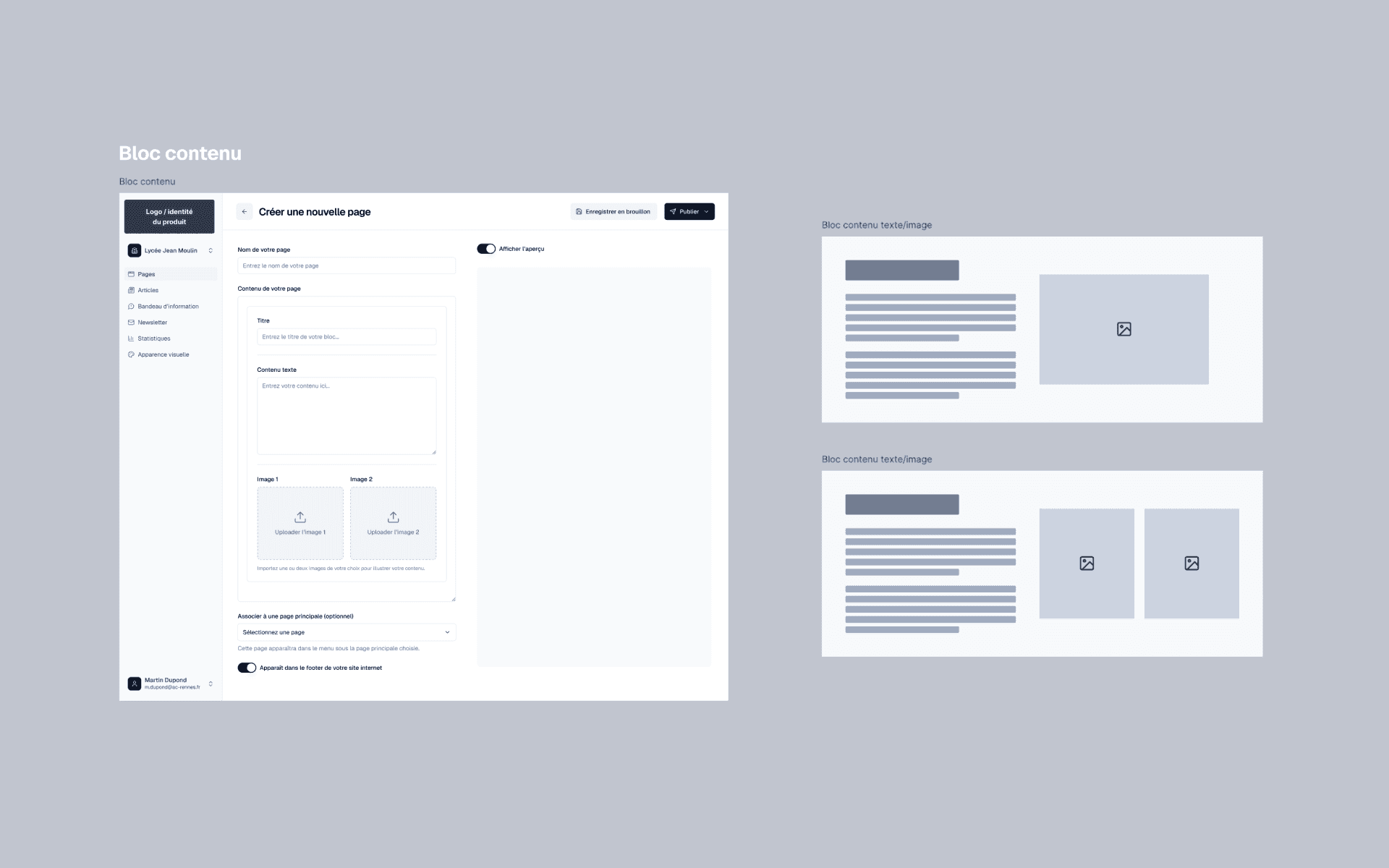
Pages and sub-pages sit in a simple tree and can be reordered by drag and drop. To build a page, the user has 13 content blocks that are easy to configure and cover the needs identified in the audit: text and image, news, events, FAQ, forms, newsletter, interactive map and embedded content.
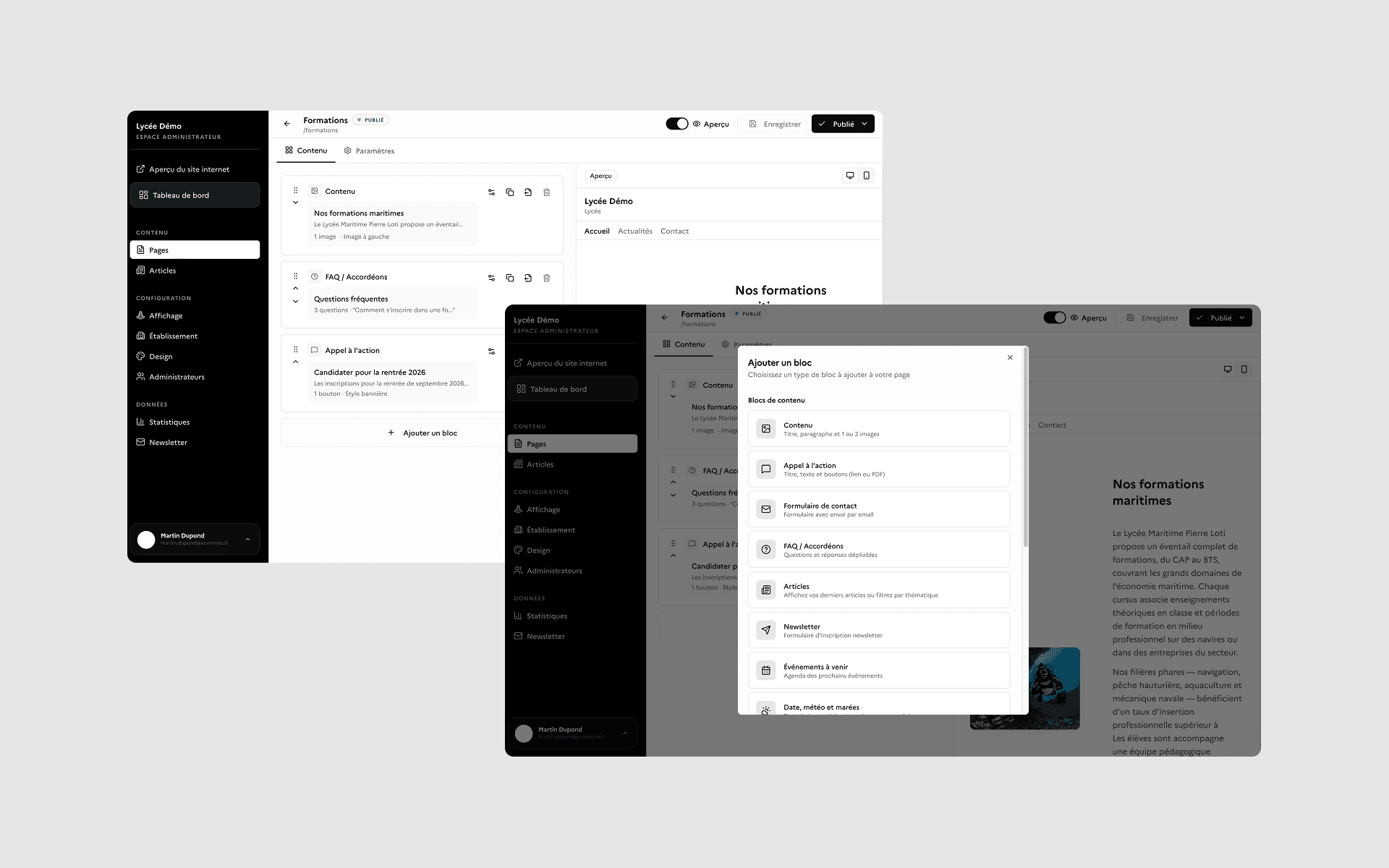
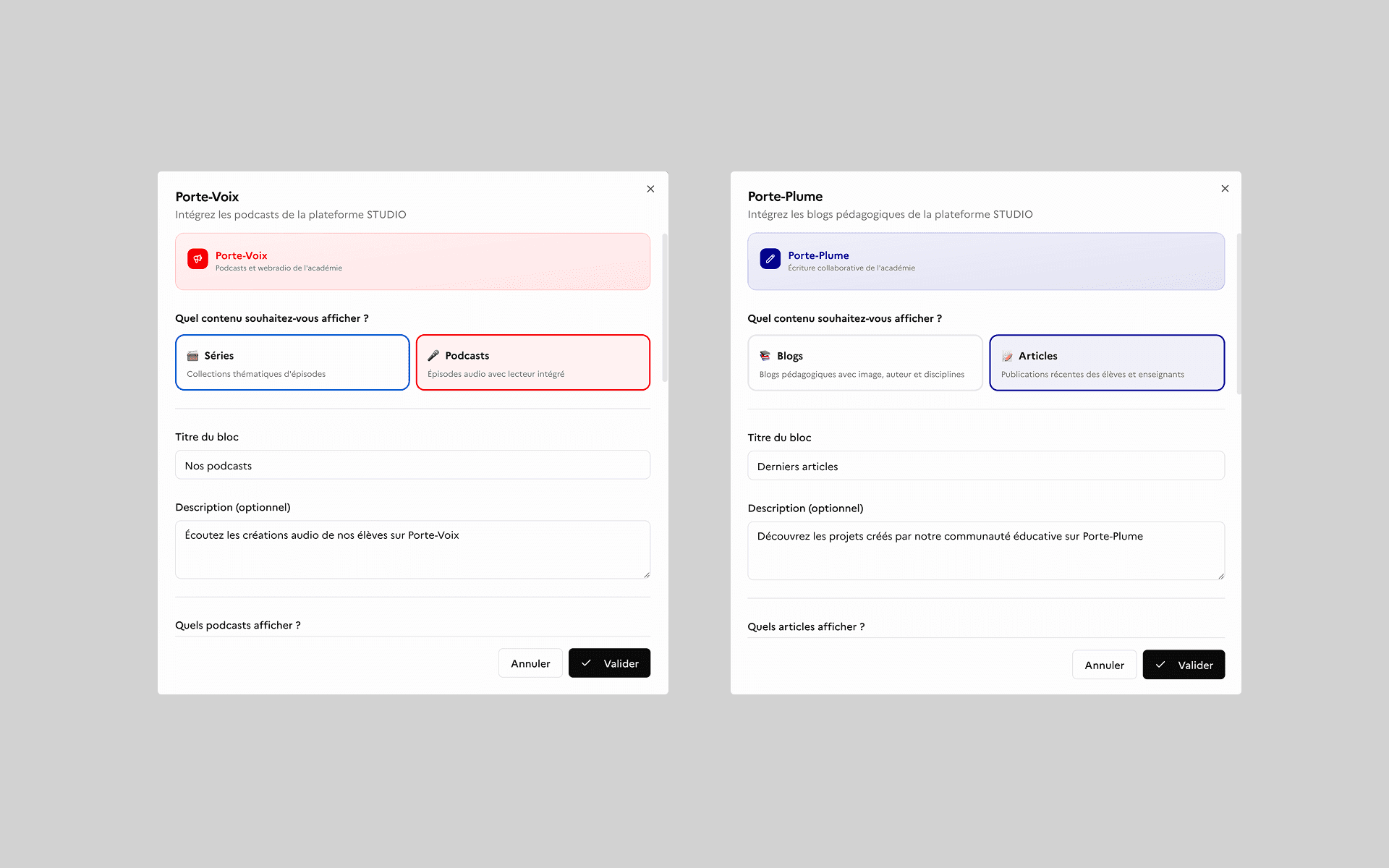
Two dedicated blocks connect to Porte-Plume and Porte-Voix, the other products in the Suite Studio family, so existing editorial and audio content can be embedded directly. It is a way of placing Sites Studio inside a coherent ecosystem and keeping continuity across the suite's tools.
Each block carries its own logic, so its settings stay limited to what genuinely matters. The product handles the rest: URL generation, SEO metadata, publication status and preview.
Building a page and writing a news article are two different activities, though. So I designed two complementary editing experiences: a block editor to structure pages, and a rich text editor to write and publish articles.
Putting AI at the heart of writing
For articles, I wanted a modern writing environment that would still feel consistent with the digital tools civil servants already use.
Rather than build it from scratch, we drew on components from existing French government products, notably from DINUM - the State's digital agency - for the rich text editing experience. Reusing those parts lets Sites Studio sit inside an environment its users already know, while sharing components rather than duplicating them.
The editor lets you write freely, format your content, and use / commands to quickly insert headings, lists, quotes, images, links, videos, embeds or PDFs. Autosave, recovery after an accidental close, and preview before publishing keep the writing safe.
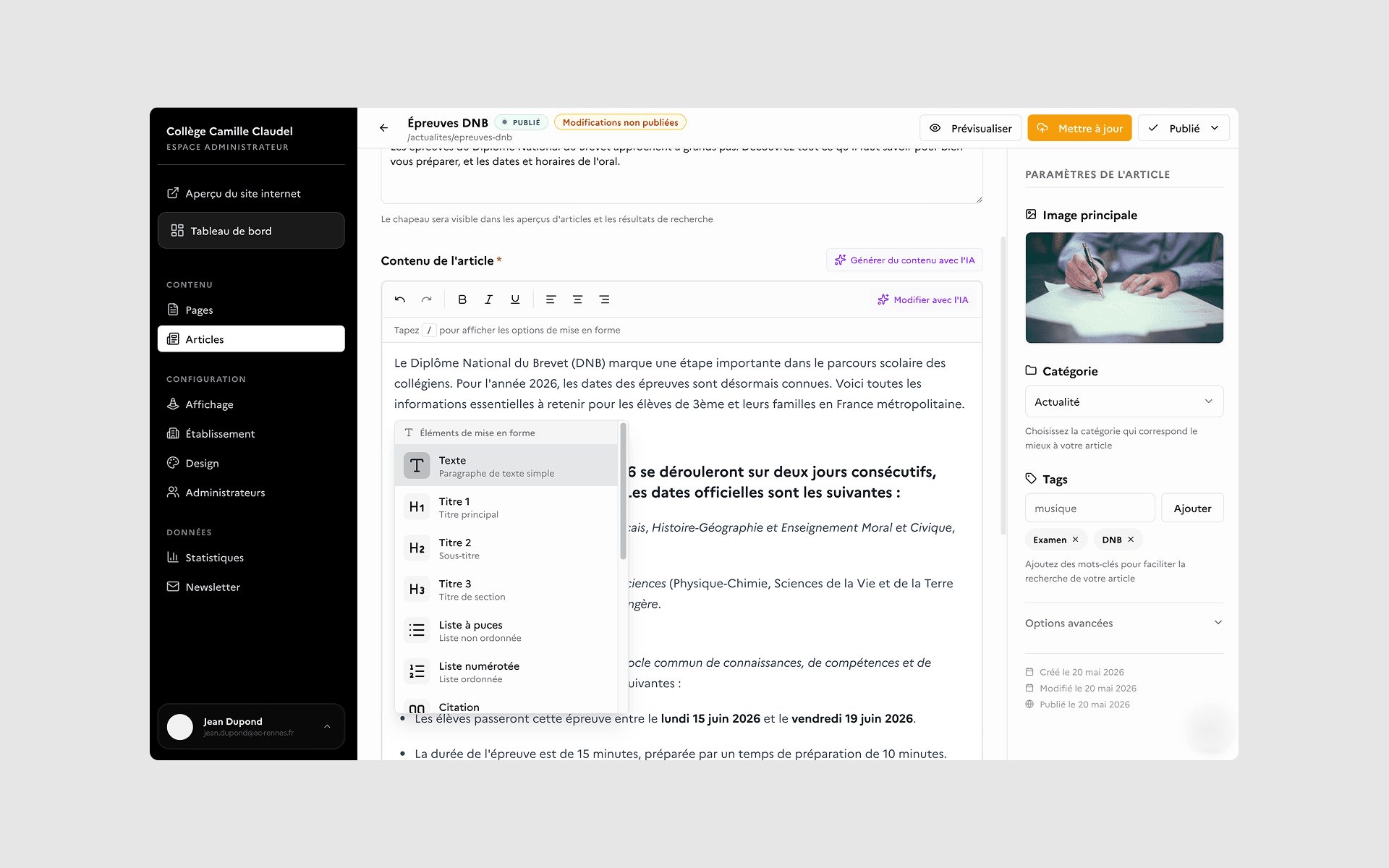
That continuity extends to Albert, the French State's sovereign AI, embedded directly in the editor. Already part of the digital ecosystem civil servants work in, here it becomes contextual writing support rather than a separate tool.
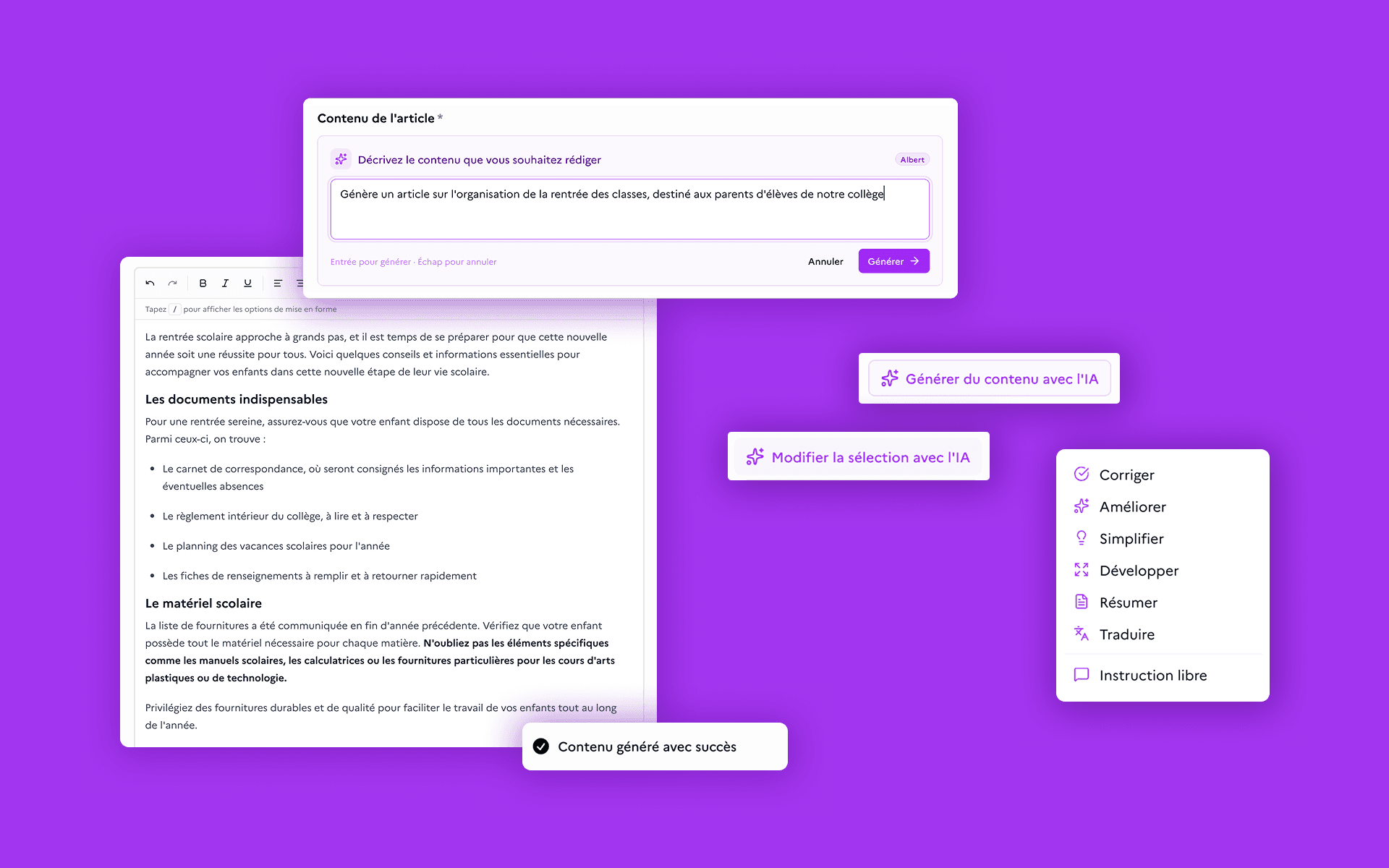
Users can generate a first draft from a brief, produce a summary automatically, or select a passage to rework. Albert can then correct, improve, simplify, expand or summarise a text, translate it - into Breton, among other languages - or follow a free-form instruction.
The point was to build on an existing digital environment rather than invent a new one: reuse proven components, reduce the learning curve, and fold AI into the act of writing itself - while leaving the user in charge of the final text.
Offering customisation without losing coherence
Across hundreds of schools, unrestricted customisation would have fragmented the experience, complicated maintenance and made accessibility much harder to guarantee.
Handing every school an identical site, on the other hand, would have left them no way to make it their own.
So I designed a deliberately bounded customisation system around four dimensions: primary colour, typeface, corner radius and background pattern - with accessibility constraints built into those settings from the start.
Schools can pick from a set of colours and typefaces - including Marianne, from the French State design system - and adjust how rounded components are. For those who want to go further, background patterns - dots, grid, waves or geometric shapes - add visual character while staying inside safe bounds. Their colour follows the chosen primary automatically, so the result stays coherent.
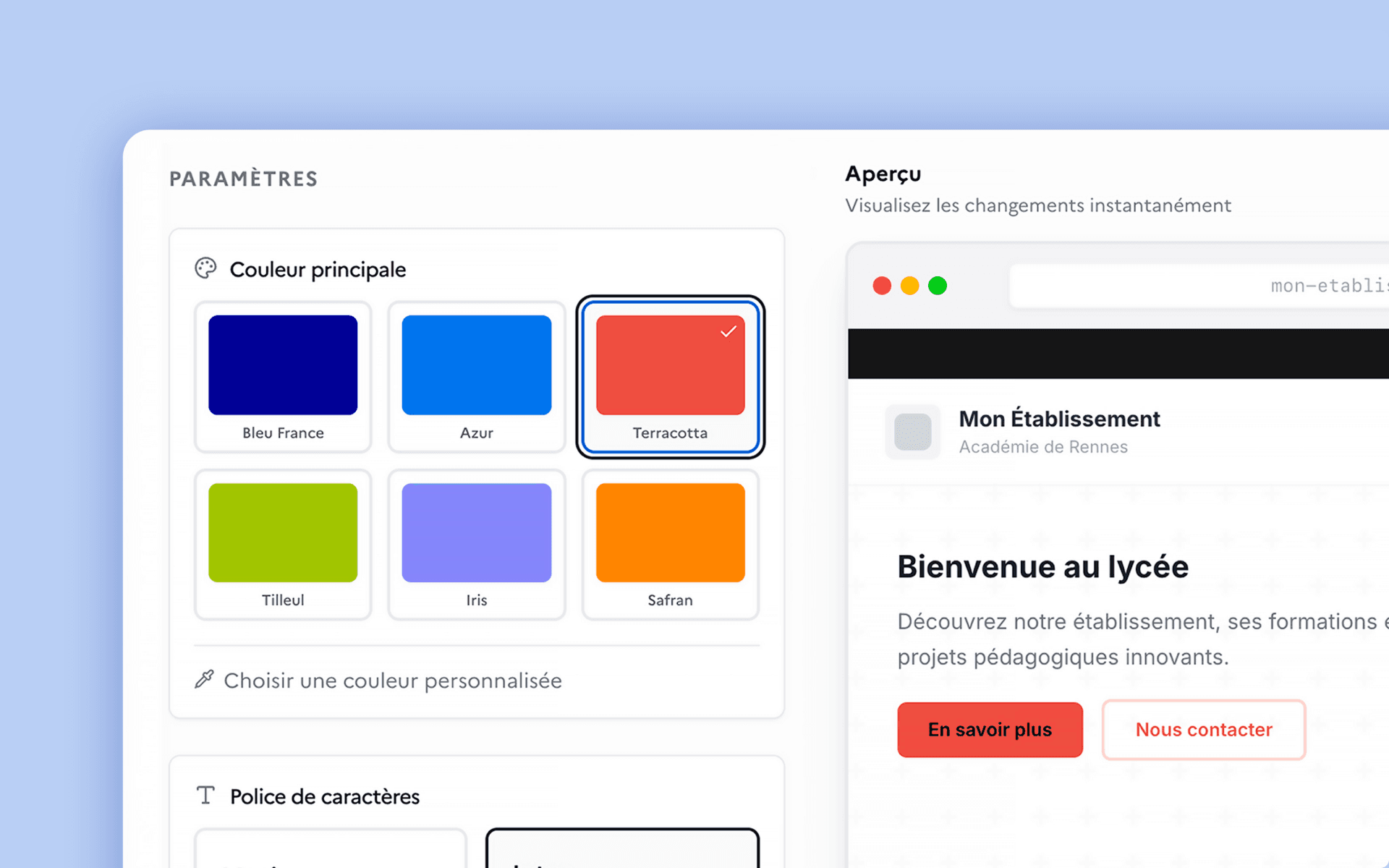
An interactive preview reflects those choices on the site's main components in real time. Users can shape their identity without ever touching the layout or the components themselves.
This bounded freedom strikes a balance between ownership, coherence across the platform, and accessibility.
The same principle shapes how the product is governed. Rather than multiply roles and permission matrices, Sites Studio runs on two profiles: Admin, who manages their own school's site, and Super Admin, who works at the scale of the whole education authority.
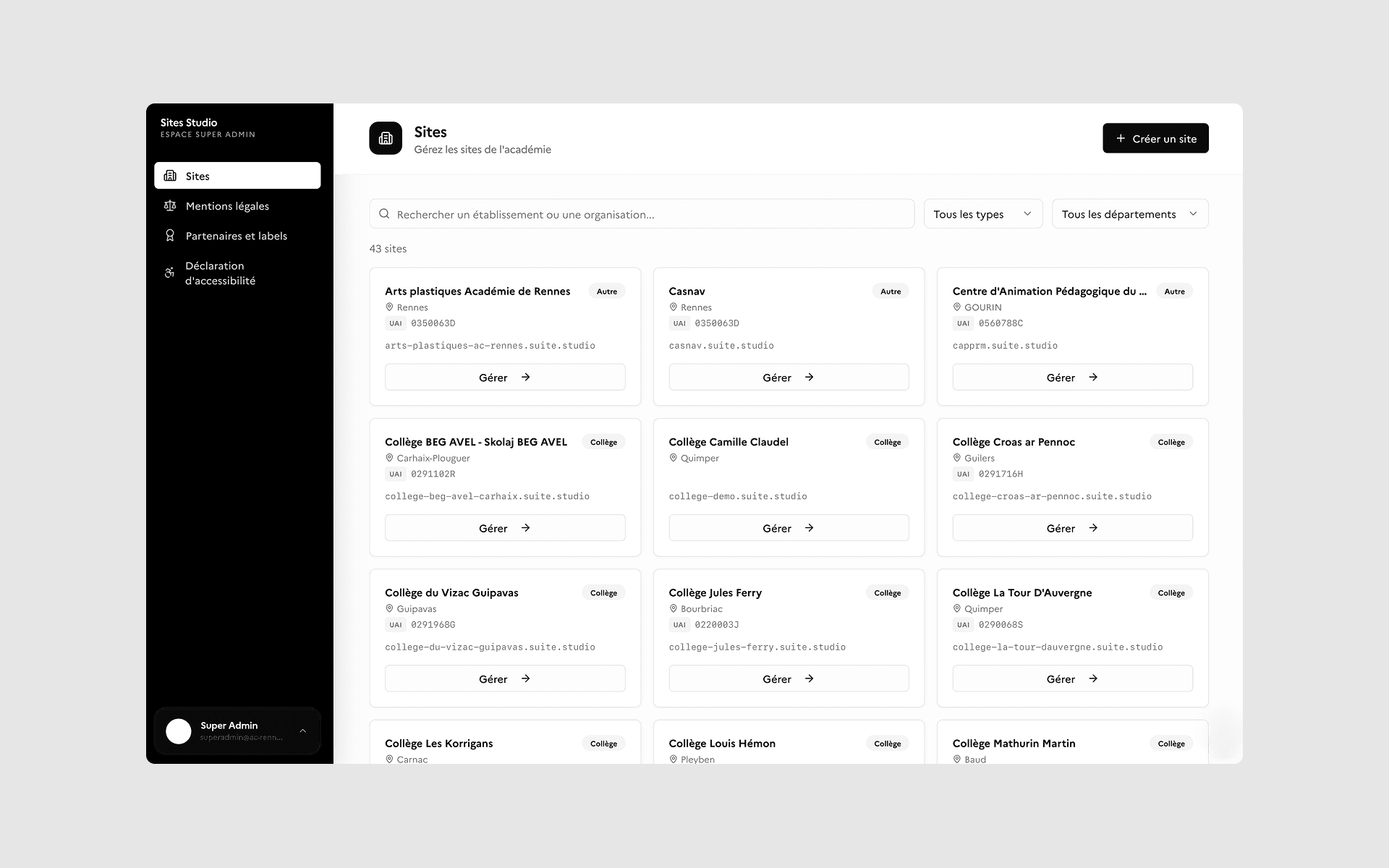
The Super Admin can manage domains, delete a site, and set the legal notice and accessibility statement templates applied by default across every school.
Customisation stays local; whatever guarantees the coherence and governance of the service stays central.
Thinking about the site as a whole
Sites Studio is not limited to creating pages and articles.
The back-office also lets each school manage the information that underpins its site: identity and contact details, opening hours, quick links, partners and labels, legal notices and display settings.
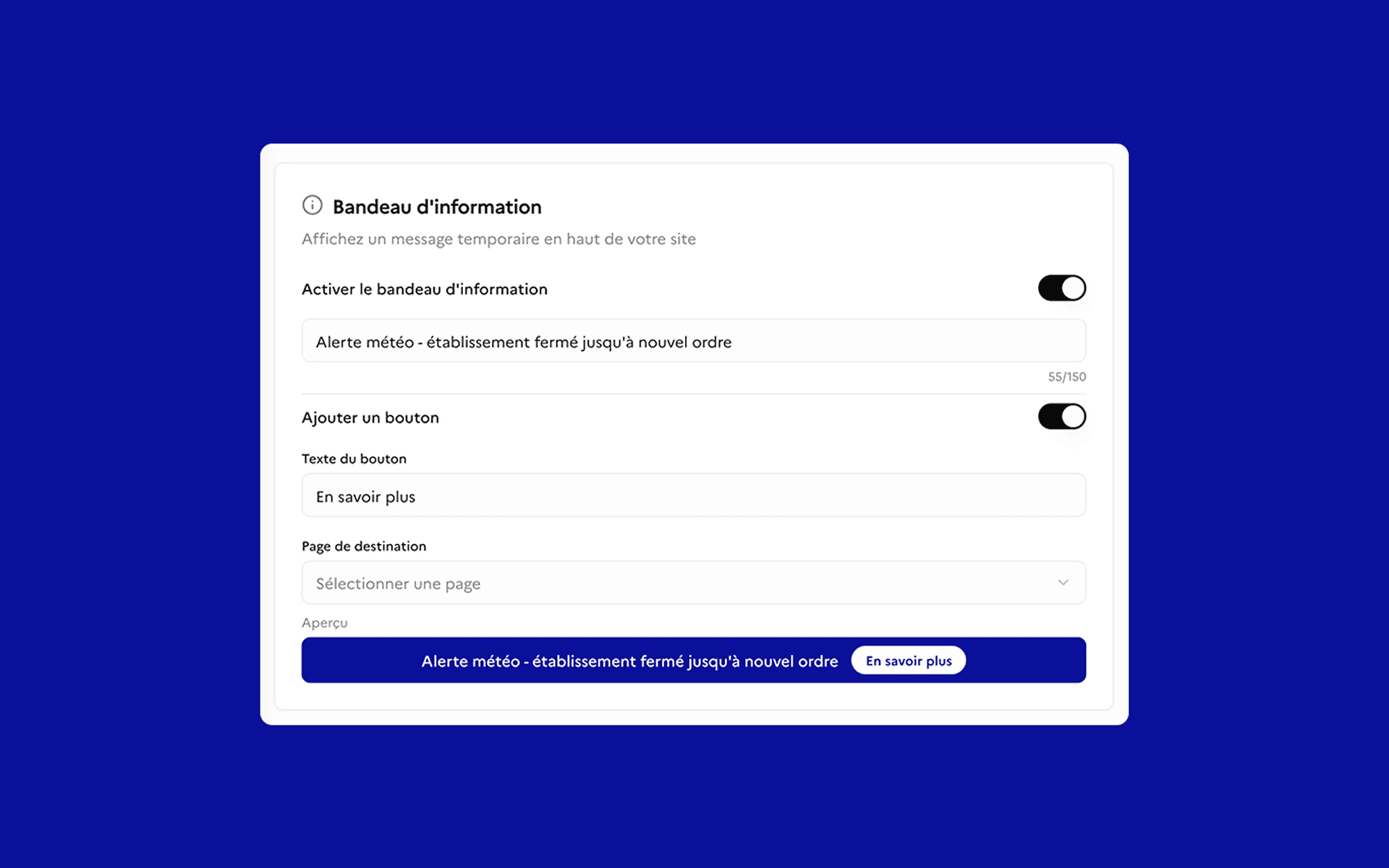
These are operational features answering real communication situations: a temporary information banner can be switched on at the top of the site, and a maintenance mode can take the public content offline behind a custom message.
That line of thinking led me to treat the product not as a CMS, but as the control room for a school's web presence.
Results and impact
The first rollouts with pilot schools point to several benefits.
The product replaces a CMS that a handful of expert users valued but most schools found complex. Early feedback highlights a more intuitive first experience and a more modern perception of the Education Ministry's digital tools - largely thanks to an experience designed for non-technical users and to the built-in AI features.
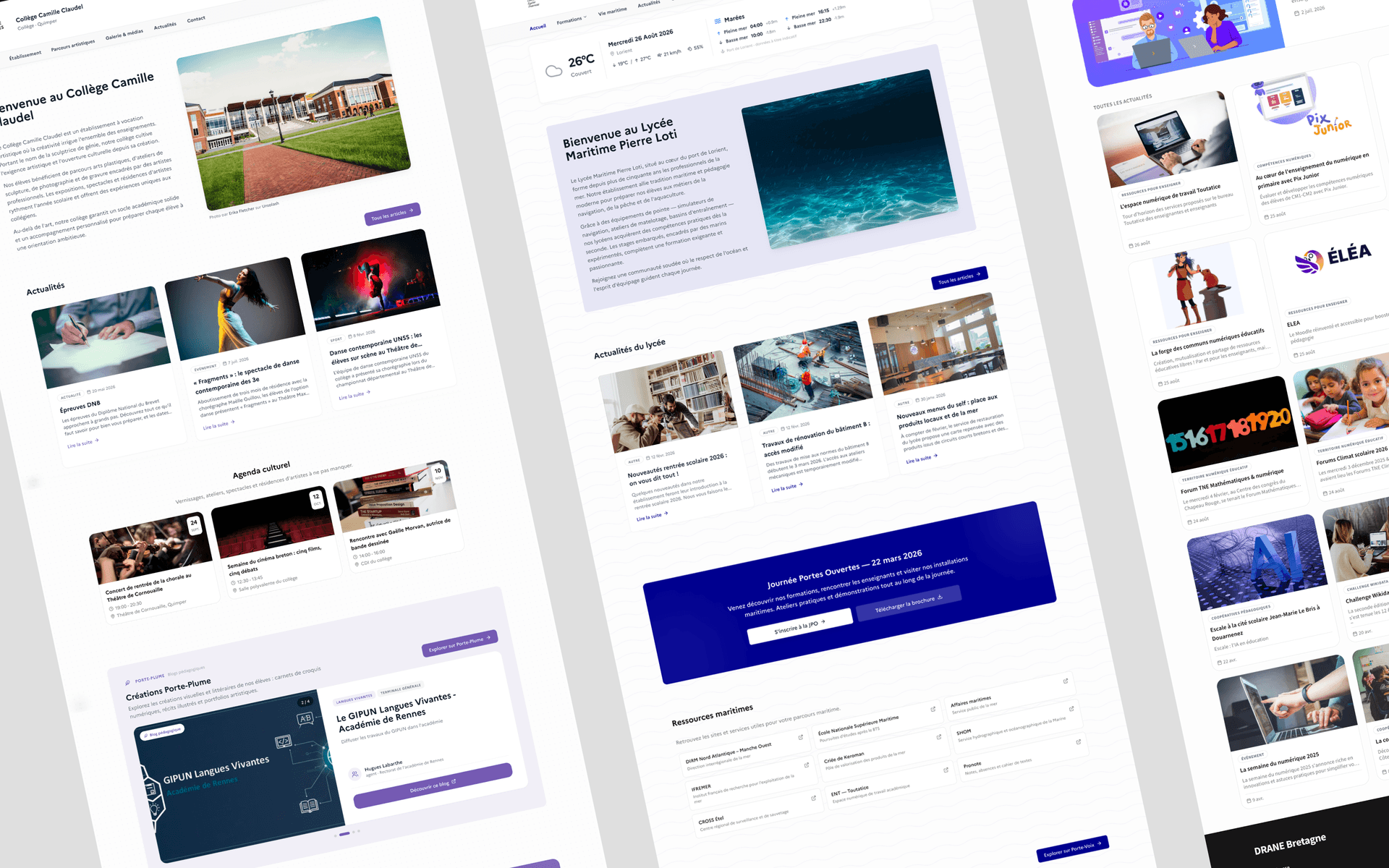
The project also modernised the platform's technical foundations, with a more robust architecture and stronger authentication, opening up new possibilities for maintenance and sustainable design.
Rolled out to a first wave of pilot schools, Sites Studio is set to be extended gradually across the whole Rennes education authority.
Built as open-source software and part of the Suite Studio product family, it has already outgrown its original scope: it is now offered to every education authority in France.
What I took away
This project taught me that a good product does not remove complexity - it absorbs it, so that it never lands on the user.
That idea runs through every level of Sites Studio: pre-filling details from a single identifier instead of a long form, generating metadata instead of asking users to configure it, offering thirteen content blocks instead of a blank page, embedding Albert directly in the article editor.
Looking back, though, I would invest more time in a proper discovery phase up front.
The needs sharpened gradually through conversations with DRANE, but framing workshops and deeper user research would have revealed the realities on the ground and the complexity of the various use cases sooner, put firmer evidence behind some of the priorities, and cut down on iteration during design.
Beyond the outcome, Sites Studio is the project that best represents how I work: understand a problem in all its complexity, structure the product before drawing its interfaces, then keep evolving it in contact with the people who use it.